



Live IssueVol. 01Spring 2026
Yellowpink.
Issue No. 01A field manual for salons that want to grow, not just survive.
◉ NEW Salon operating system · 2026

Build a
profitable
beauty store.

Yellowpink puts booking, clients, payments and website inside one system. No more five tools, three spreadsheets and two chat groups just to get through a normal day. One app. One operating rhythm.

Yellowpink app icon
Yellowpink appiOS · Android · Web
01

A salon is, in reality, a small company.

It has products (services), clients, staff, inventory and cash flow. Most owners are just forced to run all of that through too many tools and too many sheets.

We turned the real actions of a salon day into one connected system: bookings, schedules, client notes, messages, checkout, reporting, campaigns, website and share pages.

This is not a pile of CRM, booking and website software. It is a redesign around how a store actually runs from front desk to technician to manager to owner.

Roles coveredFront desk · Technician · Manager · Owner
Tools replacedBooking · CRM · Website builder
02

Nine modules, no more stitching tools together.

Each module is not an extra feature. It is a core operating ability every beauty business already needs, designed inside one shared data layer.

Module01

Booking &
schedule calendar

Let clients book 24/7 while staff shifts, availability, time off and conflicts stay visible in one calendar.

CalendarSchedulingReminders
Module02

Client
records center

History, preferences, allergies and notes stay attached to the client instead of living inside one employee’s memory.

ProfilesTagsFollow-up
Module03

Orders &
checkout

Service logs, tips, discounts and revenue splits move through one order flow so checkout stays fast and traceable.

OrdersStripePayouts
Module04

Membership &
loyalty

Points, tiers, member pricing and birthday perks help keep the right clients coming back more often.

MembersPointsBenefits
Module05

Gift cards &
coupons

Digital gift cards and targeted offers support repeat visits, gifting and campaign-based promotions.

Gift cardsCouponsCampaigns
Module06

Store website &
share pages

Services, pricing, portfolio, team and location update once and publish everywhere clients see your brand.

WebsiteSEOShare
Module07

Automated messages &
follow-up

Confirmation, reschedule reminders, post-visit check-ins and seasonal outreach happen automatically.

SMSEmailAutomation
Module08

Analytics &
attribution

Bookings, revenue, repeat rate and website traffic appear in one view so growth decisions are not guesswork.

AnalyticsAttributionReview
Module09

Staff accounts &
permissions

Front desk, technicians, managers and owners each see the right view while multi-store coordination stays clear.

PermissionsTeamMulti-store
03

Not concept art, real working screens.

The images here are pulled from the actual product. Visitors see how Yellowpink works before they ever book a demo.

Story 01 · Scheduling

The front desk can see the day before the chaos begins.

New bookings, time changes, arrivals and conflicts sit inside one shared schedule so the team stops relaying status by chat.
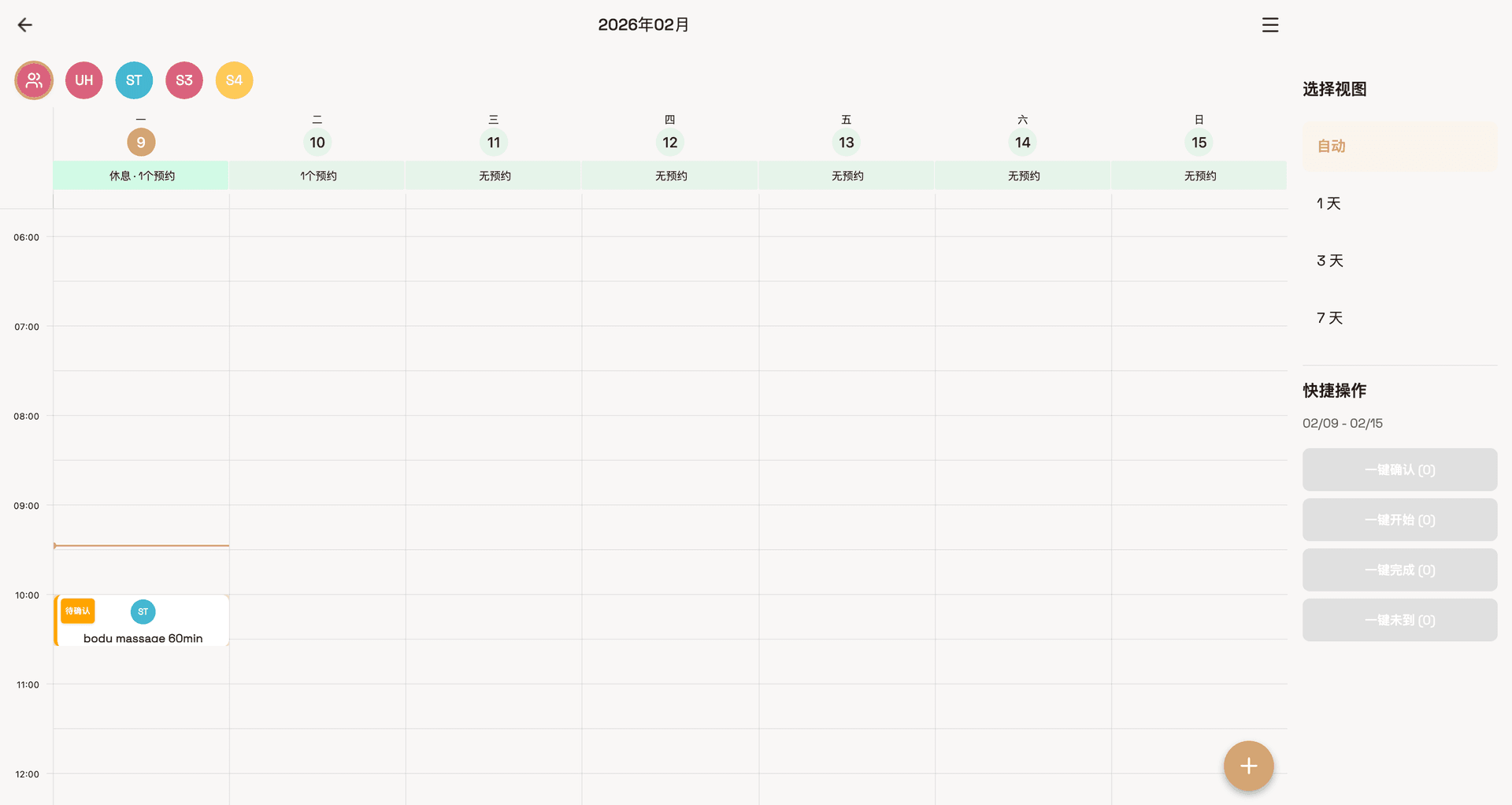
  • Handle new, rescheduled and cancelled bookings in one place
  • See availability and time off by employee
  • Keep front desk and technicians aligned on the same day plan
Yellowpink booking calendar
Fig. 01 — Yellowpink booking calendar
Story 02 · Client ops

A client is not just today’s service. It is why they return next time.

Profiles collect history, preferences and follow-up signals so retention becomes systematic instead of accidental.

  • Track history, preferences and service notes together
  • Connect tags, memberships and gift cards to one profile
  • Keep post-visit follow-up practical and consistent
Yellowpink client records
Fig. 02 — Yellowpink client records
Story 03 · Revenue clarity

Owners stop asking “Are we busy?” and start asking “Do we understand today’s revenue?”

Orders, repeat visits, website traffic and campaign performance resolve into one operating view for clearer decisions.
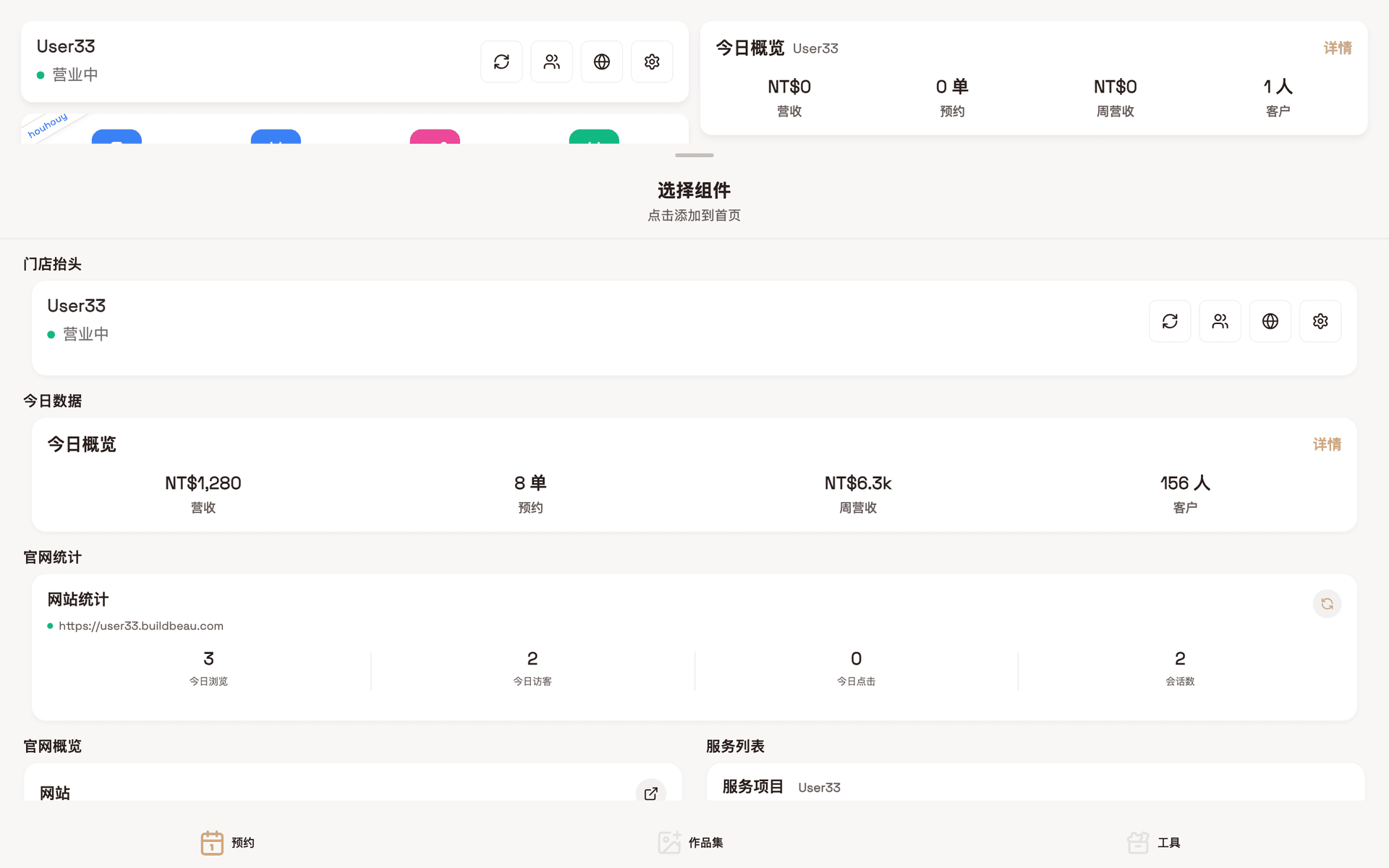
  • Read revenue, orders and traffic on one screen
  • Review marketing and website acquisition together
  • Turn intuition into visible business signals
Yellowpink analytics dashboard
Fig. 03 — Yellowpink analytics dashboard
What used to be a store barely coping is now a system where front desk, technicians, managers and owners can actually speak to each other.
— Yellowpink operating principle
04

What salons need most is not more features.

They need fewer switches, faster setup and multilingual readiness that is obvious at a glance.

10m
First setup

Configure services, staff, scheduling rules and website basics

24/7
Online booking

Clients can book from your website or share page anytime

6
Languages

The marketing site and salon websites support multiple locales

05

Those scattered tools can shut down one by one.

The value of Yellowpink is not another app. It is pulling the fragmented work back into one operating surface.

01 /Third-party booking appReplace
02 /Excel client sheetReplace
03 /Chat-group scheduling and remindersReplace
04 /Manual checkout ledgerReplace
05 /Manual gift card and coupon trackingReplace
06 /Separate website builder subscriptionReplace
07 /Bulk messaging platformIntegrate
08 /Monthly reports assembled by handAutomate
06

Three steps from
open for business to
ready to grow.

You do not turn on every module at once. You establish the foundation, standardize the routine and then open the growth switches in order.

I

First, build the
foundation.

Services, staff, schedules, operating hours and website identity become one source of truth. Automation only works after that.

Modules involved
  • M01 Booking calendar · Scheduling rules
  • M06 Website · Brand information
  • M09 Staff accounts · Permissions
II

Then turn the daily routine into
SOP.

Arrival, service, checkout and follow-up move into one repeatable flow so new staff ramp faster and senior staff execute more consistently.

Modules involved
  • M02 Client records · Tags
  • M03 Orders · Checkout
  • M07 Automated messages · Follow-up
III

Then switch on
growth.

Membership, gift cards, campaigns and website acquisition start working together so repeat visits and ticket size improve by system, not luck.

Modules involved
  • M04 Membership · Loyalty
  • M05 Gift cards · Coupons
  • M08 Analytics · Attribution
07

One monthly fee,
nothing per seat.

No pricing by staff count, bookings or store count. Solo artists can stay free forever. A store is USD 169 per month.

Tier IFree forever

Solo
Artist

Built for home studios and early-stage independent artists: website, booking and client records are already included.

USD0/forever
  • 1 staff seat with permissions
  • Up to 200 portfolio items
  • Unlimited services and share pages
  • Yellowpink subdomain included
  • Basic analytics dashboard
Tier IIRecommended

Pro
Store

The full operating system for a real store: booking, clients, payments, website, loyalty and multi-store management.

USD169/month
  • Unlimited staff seats with role permissions
  • Unlimited services and portfolio items
  • Custom domain, multilingual website and advanced SEO
  • Membership, points, gift cards and coupons
  • Multi-store controls, revenue split and advanced analytics
  • SMS / email automation included
08

Real operators, speaking plainly.

These are the kinds of concrete outcomes the page should communicate: less chaos, clearer retention and one shared source of truth.

Voice No.01
Before Yellowpink, our front desk kept switching between chat and the booking app all day. Now bookings, changes, arrivals and checkout sit in one flow, and the store feels calmer.
LinStore owner · Toronto
Voice No.02
Once client records stayed in the system, we stopped losing context whenever staff changed. Retention became something we could actually operate.
MiaManager · Vancouver
Voice No.03
The website and the backend finally share the same data. We update prices and services once, and the public-facing pages stay correct without extra maintenance.
ZoeBrand founder · San Jose
09

What you are
probably asking.

Q/01Is Yellowpink a website tool or a salon system?+
Both. Its core position is a salon operating system for booking, clients, orders and loyalty. The website is the outward-facing layer of the same operating data.
Q/02How long from signup to taking bookings?+
Usually 10–20 minutes for solo artists, 20–30 minutes for one store, and within half a day for more complex multi-store setups.
Q/03Does it support multi-store and role-based permissions?+
Yes. Owners can see the full network, managers see their own store, and technicians only see the schedules and client context relevant to them.
Q/04Can we migrate if we already use other tools?+
Yes. Client records and service catalogs can be imported in bulk. If you currently run on spreadsheets, booking apps or chat groups, we can help you migrate without interrupting business.
Q/05Which payment methods are supported?+
Through Stripe we support mainstream cards, Apple Pay and Google Pay, while still allowing offline cash or scanned payments to be recorded inside the same order flow.
Q/06Who owns the data, and what if we leave?+
You do. Client, order and service data can be exported. We do not trap your data or repurpose it outside your business.